第二章 Vue2进阶使用 v1.0
第一部分 Vue自定义
一、自定义指令(directive)
通过directive定义自己的指令,封装一些dom操作,扩展额外功能
在对应使用范围内通过:<标签名 v-指令名>使用
1.全局注册
全局注册通常在main.js文件中进行,指令可以在任何组件中使用,无需额外的导入或声明。
Vue.directive('指令名', {
  "inserted" (el){  // 钩子函数,inserted在元素添加到页面时进行操作
    // 对el标签,扩展额外功能
  }
})bind: 只调用一次,指令第一次绑定到元素时调用。
inserted: 被绑定元素插入父节点时调用(仅保证父节点存在,但不一定已被插入文档中)。
update: 所在组件的 VNode 更新时调用,但是可能发生在其子 VNode 更新之前。
componentUpdated: 所在组件的 VNode 及其子 VNode 更新后调用。
unbind: 只调用一次,指令与元素解绑时调用。示例(插入元素时聚焦)
Vue.directive('focus', {
  "inserted" (el){
    el.focus()
  }
})<template>
<input v-focus>
</template>2.局部注册
局部注册的指令只能在定义它的组件内使用,通常在组件的directives选项中进行。
<script>
  export default {
    directives: {
      "指令名": {
        inserted (el) {  //在元素添加到页面时进行操作
          //对el标签,扩展额外功能
        }
      }
    }
  }
</script>
3.自定义指令传值
- 绑定指令时,可以传入值为指令绑定具体参数值:<标签名 v-指令名="参数值">
- 在注册时可以通过
binding.value拿到指令值,指令值修改会触发update函数
directives: {
  color: {
    inserted (el, binding) {  // 在元素添加到页面时进行操作
      el.style.color = binding.value
    },
    update (el, binding) {    // 在指令值更新时进行操作
      el.style.color = binding.value
    }
  }
}<template>
<input v-color="#000000">
</template>4.使用示例(加载指令封装)
v-loading封装
场景:实际开发过程中,发送请求需要时间,在请求的数据未回来时,页面会处于空白状态,用户体验不好
分析:
1. 本质loading效果就是一个蒙层,盖在盒子上
2. 数据请求中开启loading状态,添加蒙层;请求结束关闭loading状态,移除蒙层
实现:
1. 准备一个loading类,通过伪元素定位设置宽高,实现蒙层
2. 开启关闭loading状态(添加移除蒙层),本质只需要添加移除类即可
3. 通过自定义指令语法进行封装复用<template>
<div class="box" v-loading="isLoading"></div>
</template>
<script>
import axios from 'axios'
export default {
data () {
return {
isLoading: false
}
},
async created () {
this.isLoading = true
const res = await axios.get("http://...")
this.list = res.data.data
this.isLoading = false
},
directives: {
loading: {
inserted(el,binding) {
binding.value ? el.classList.add('loading') : el.classList.remove('loading')
},
update(el,binding) {
binding.value ? el.classList.add('loading') : el.classList.remove('loading')
}
}
}
}
</script>
<style>
.loading:before{ /* 1.定义loading类实现蒙层 */
content:'';
position: absolute;
left: 0;
top: 0;
width: 100%;
height: 100%;
background: #fff url('./loading.gif') no-repeat center; /* url提供gif作蒙层 */
}
</style>二、插槽
插槽可以让子组件内部的一些结构支持自定义,允许子组件定义可复用的布局,同时将一些区域保留为可填充的内容。
1.插槽的使用
<template>
  <div>
    <slot></slot>  <!-- 在需要定制的地方指定插槽 -->
  </div>
</template><template>
<div>
<MyDialog>
插槽的内容
</MyDialog>
</div>
</template>
<script>
import MyDialog from 'MyDialog.vue'
export default {
components: {
MyDialog
}
}
</script><!--封装组件时,可以为预留的插槽提供显示的后备内容(默认值),若传值则会替换默认内容-->
<template>
<div>
<slot>插槽的默认内容</slot>
</div>
</template>2.具名插槽
一个组件内有多处结构,需要外部传入标签,进行定制时需要用到具名插槽
<!-- 使用多个slot和name属性区分名字 -->
<template>
  <div class="dialog-header">
    <slot name="header">header插槽的默认内容</slot>
  </div>
  <div class="dialog-content">
    <slot name="content">content插槽的默认内容</slot>
  </div>
  <div class="dialog-footer">
    <slot name="footer">footer插槽的默认内容</slot>
  </div>
</template><!-- template标签配合 v-slot: 分发对应标签,v-slot: 可以简化为 # -->
<template>
<MyDialog>
<template v-slot:header>
header
</template>
<template v-slot:content>
content
</template>
<template #footer> <!-- v-slot: 简化为 # -->
footer
</template>
</MyDialog>
</template>3.作用域插槽
定义slot插槽的同时,是可以传值的。插槽上可以绑定数据,将来使用组件时可以用。
- slot标签以属性方式传值:
<slot :id="item.id" msg="element"></slot> - 在template中通过
#插槽名="obj"接收,默认插槽名为default
<template>
  <MyTable :list="list">
    <template #default="obj">
      <button @click="del(obj.id)">删除</button>
    </template>
  </MyTable>
</template>
示例:列表管理
<template>
  <div>
    <MyTable :data="list">
      <!-- 3. 通过template #插槽名="变量名" 接收子组件传递的对象 -->
      <template #default="obj">
        <button @click="del(obj.row.id)">
          删除
        </button>
      </template>
    </MyTable>
    <MyTable :data="list2">
      <template #default="{ row }">
        <button @click="show(row)">查看</button>
      </template>
    </MyTable>
  </div>
</template>

<script>
import MyTable from './components/MyTable.vue'
export default {
  data () {
    return {
      list: [
        { id: 1, name: '张小花', age: 18 },
        { id: 2, name: '孙大明', age: 19 },
        { id: 3, name: '刘德忠', age: 17 },
      ],
      list2: [
        { id: 1, name: '赵小云', age: 18 },
        { id: 2, name: '刘蓓蓓', age: 19 },
        { id: 3, name: '姜肖泰', age: 17 },
      ]
    }
  },
  methods: {
    del (id) {  //过滤(删除)对应元素
      this.list = this.list.filter(item => item.id !== id)
    },
    show (row) {
      alert(`姓名:${row.name}; 年纪:${row.age}`)
    }
  },
  components: {
    MyTable
  }
}
</script><template>
<table class="my-table">
<thead>
<tr>
<th>序号</th>
<th>姓名</th>
<th>年纪</th>
<th>操作</th>
</tr>
</thead>
<tbody>
<tr v-for="(item, index) in data" :key="item.id">
<td>{{ index + 1 }}</td>
<td>{{ item.name }}</td>
<td>{{ item.age }}</td>
<td>
<!-- 1. 给slot标签,添加属性的方式传值 -->
<slot :row="item" msg="测试文本"></slot>
<!-- 2. 将所有的属性,添加到一个对象中 -->
<!--
{
row: { id: 2, name: '孙大明', age: 19 },
msg: '测试文本'
}
-->
</td>
</tr>
</tbody>
</table>
</template>
<script>
export default {
props: {
data: Array
}
}
</script>
<style scoped>
.my-table {
width: 450px;
text-align: center;
border: 1px solid #ccc;
font-size: 24px;
margin: 30px auto;
}
.my-table thead {
background-color: #1f74ff;
color: #fff;
}
.my-table thead th {
font-weight: normal;
}
.my-table thead tr {
line-height: 40px;
}
.my-table th,
.my-table td {
border-bottom: 1px solid #ccc;
border-right: 1px solid #ccc;
}
.my-table td:last-child {
border-right: none;
}
.my-table tr:last-child td {
border-bottom: none;
}
.my-table button {
width: 65px;
height: 35px;
font-size: 18px;
border: 1px solid #ccc;
outline: none;
border-radius: 3px;
cursor: pointer;
background-color: #ffffff;
margin-left: 5px;
}
</style>第二部分 路由
一、应用程序
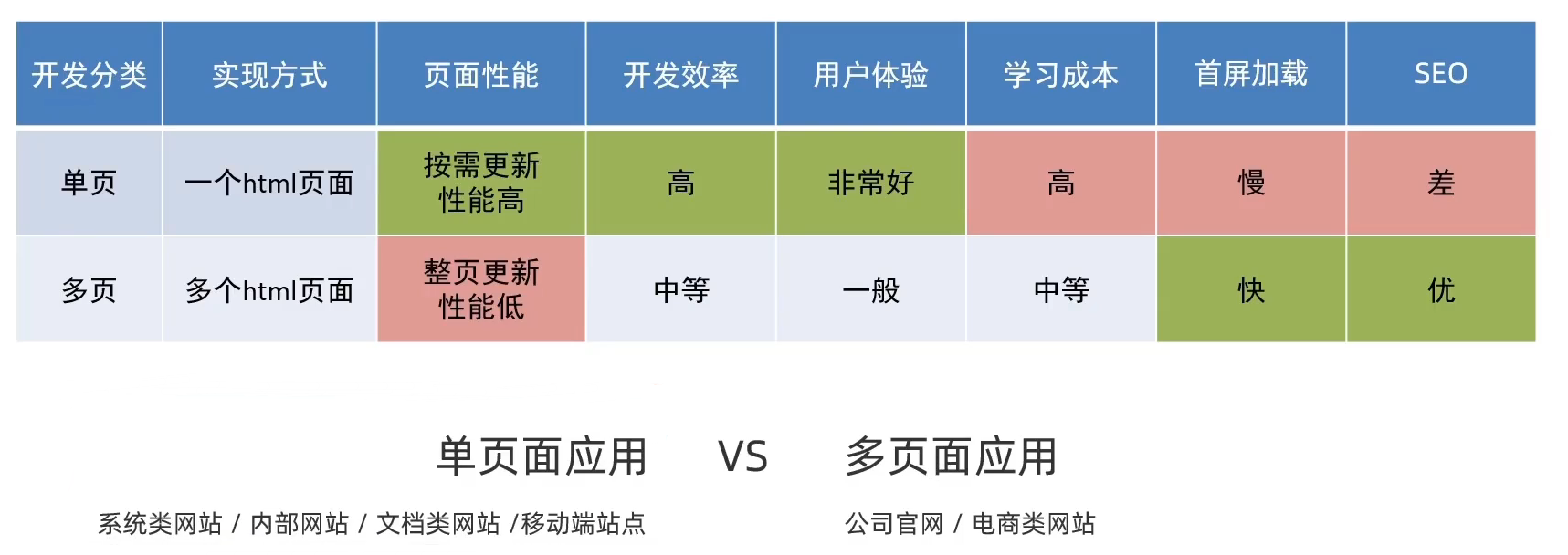
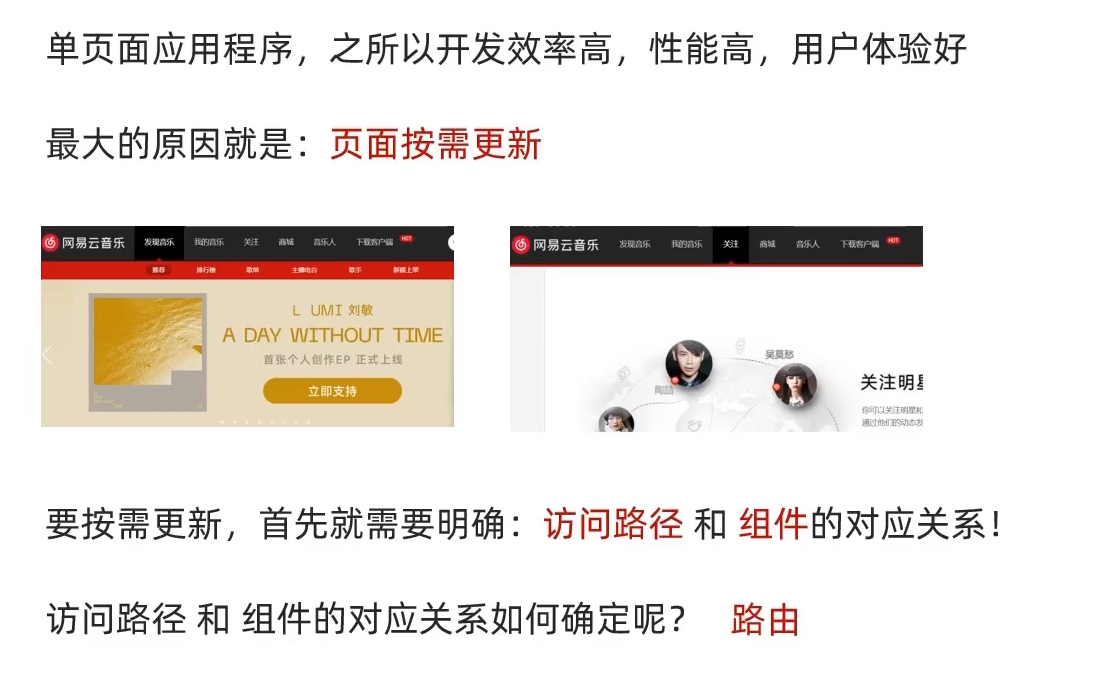
1.单页与多页应用程序对比
二、VueRouter
以Vue2 VueRouter v3.x为例
1.Vue路由简介
路由是一种映射关系,而在Vue中,路由是指 路径 与 组件 之间的映射关系
2.VueRouter简介
VueRouter是Vue官方的一个路由插件,可以在修改地址栏路径时,切换显示匹配的组件
官网:https://v3.router.vuejs.org/zh
3.使用步骤
①定义路由(五步)
// 1.添加模块到当前工程:npm i vue-router
// 2.引入vue-router
import VueRouter from 'vue-router'
// 3.安装注册,VueRouter插件初始化
Vue.use(VueRouter)
// 4.创建路由对象
const router = new VueRouter()
// 5.注入,将对象注入new Vue实例中,建立关联
new Vue({
  render: h => h(App),
  router  //完整写法为 router: router ,当且仅当路由对象名为router时可简写为router
}).$mount('#app')
②创建需要的组件,配置路由规则
import Find from './views/Find.vue'
import My from './views/My.vue'
import Friend from './views/Friend.vue'

const router = new VueRouter({
  routes: [
    // {path: '地址栏路径', component: 视图组件, redirect: 重定向地址, children: 嵌套子路由 }
    { path: '/find', component: Find },
    { path: '/my', component: My },
    { path: '/friend', component: Friend },
  ]
})
③配置导航,配置路由出口
<div>
  <a href="#/find">发现</a>
  <a href="#/my">我的</a>
  <a href="#/friend">朋友</a>
</div>
<div class="top">
  <router-view></router-view>
</div>
4.路由的封装抽离
import Find from '@/views/Find'
import My from '@/views/My'
import Friend from '@/views/Friend'

import Vue from 'vue'
import VueRouter from 'vue-router'
Vue.use(VueRouter) // VueRouter插件初始化

// 创建了一个路由对象
const router = new VueRouter({
  routes: [
    { path: '/find', component: Find },
    { path: '/my', component: My },
    { path: '/friend', component: Friend },
  ]
})
// 导出路由对象
export default routerimport Vue from 'vue'
import App from './App.vue'
import router from './router/index'
new Vue({
render: h => h(App),
router
}).$mount('#app')5.重定向
语法:{ path: '/匹配路径', redirect: '/重定向路径' }
const router = new VueRouter({
  routes: [
    { path: '/', redirect: '/home' },
    { path: '/home', component: Home },
  ]
})
6.404页面
当路径找不到匹配时,给出提示页面,需要配置在路由最后
const router = new VueRouter({
  routes: [
    { path: '/home', component: Home },
    ... ,
    { path: '*', component: NotFound },
  ]
})
7.模式设置
在Vue中,默认模式是hash路由模式,需要切换为真正路径模式可以通过改为history路由模式实现
- hash路由(默认),例如:
http://localhost:8080/#/home - history路由(常用),例如:
http://localhost:8080/home(以后,上线需要服务器端支持)
const router = new VueRouter({
  mode: 'history',
  routes: []
})
三、VueRouter导航
1.声明式导航——导航链接(<router-link>)
在VueRouter中提供了一个全局组件
<router-link>用于取代<a>标签
优点:①能跳转,本质还是<a>标签 ②能高亮,默认提供高亮类名,用于设置高亮样式
标准写法:<router-link to="/path">显示文字</router-link>
对比<a>写法:<a href="#/path">显示文字</a>
高亮:<router-link>自动给当前导航添加两个高亮类名,需要在下面<style>添加对应属性
router-link-active:模糊匹配(使用更多),to="/my"可以匹配/my、/my/abc等
router-link-exact-active:精确匹配,to="/my"仅可以匹配/my
使用示例:.footer a.router-link-active { ... }
高亮配置:定制高亮类名,需要在router对象中进行配置
const router = new VueRouter({
  routes: [],
  linkActiveClass: "active",  //配置模糊匹配类名
  linkExactActiveClass: "exact-active",  //配置精确匹配类名
})
2.编程式导航——基本跳转
①path路径跳转
//简写
this.$router.push("路由路径")
//完整写法
this.$router.push({
  path: "路由路径",
  query: {  //可以替代查询参数传参
    参数名1: "参数值1",
    ...
  },
  params: { 参数名: "参数值" }  //可以替代动态路由传参
})
②name命名路由跳转
this.$router.push({
  name: "路由名"  //需要定义路由指定name { name:"路由名", path:"/path", ... }
})
③其他跳转方式
- 返回上一页:
$router.back()
3.跳转传参
①查询参数传参(适合多个参数)
标准语法:<router-link to="/path?参数名=值">显示文字</router-link>
获取对应页面组件接收传递的参数值:this.$route.query.参数名
②动态路径传参(适合单个参数)
- 配置动态路由
const router = new VueRouter({
  routes: [
    { path:'/search/:参数名', component: Search },  //使用 :参数名 指定动态路由参数(必选)
    { path:'/search/:参数名?', component: Search }  //使用 ? 表示参数可选
  ]
})- 配置链接导航:
<router-link to="/path/参数值">显示文字</router-link> - 对应页面组件接受传递过来的值:
this.$route.params.参数名
四、组件缓存
路由跳转后,组件被销毁,返回之后组件又将重建,数据需要重新加载,此时需要用到组件缓存
1.组件缓存的优点
在组件切换过程中把切换出去的组件保留在内存中,防止重复渲染,减少加载时间及性能消耗,提高用户体验性。
2.keep-alive简介
keep-alive是Vue的内置组件,当它包裹动态组件时,会缓存不活动的组件实例,而不是销毁它们。
keep-alive是一个抽象组件:它自身不会渲染成一个DOM元素,也不会出现在父组件链中。
3.keep-alive使用
<keep-alive :include="['LayoutPage']">  <!-- 只缓存LayoutPage内容 -->
  <router-view></router-view>
</keep-alive>
4.keep-alive详解
keep-alive有三个属性,可以通过指定不同的属性进行不同配置:
- include:组件名数组,只有匹配的组件会被缓存
- exclude:组件名数组,任何匹配的组件都不会被缓存
- max:最多可以缓存多少组件实例
keep-alive被缓存的组件会多两个生命周期钩子:actived(已激活) deactived(已失活)
第三部分 Vuex
一、简介
1.Vuex
vuex是一个vue的状态管理插件,可以帮我们管理vue通用的数据(多组件共享的数据)
2.优点
①共同维护一份数据,数据集中化管理
②响应式变化
③操作简洁(vuex提供了一些辅助函数)
二、使用
1.创建仓库
import Vue from 'vue'
import Vuex from 'vuex'

//使用插件
Vue.use(Vuex)

//创建仓库
const store = new Vuex.Store()

new Vue({
  render: h => h(App),
  store
}).$mount('#app')
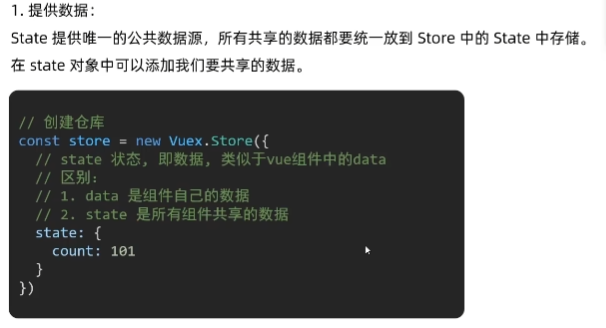
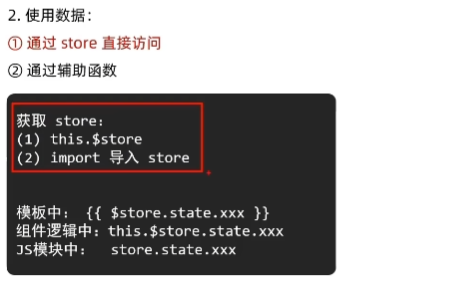
2.提供/访问数据